Used 3D printer hours: what wears out and how to check

No maker publishes an hour limit for a whole consumer printer. The hours show which wear parts are due, and Bambu Lab A1 and P1, Original Prusa and Klipper printers running Moonraker keep a count.

By Desktop 3D Printers Editorial TeamPublished Verified

Part of the topic Buying a used 3D printer: what to know before you pay
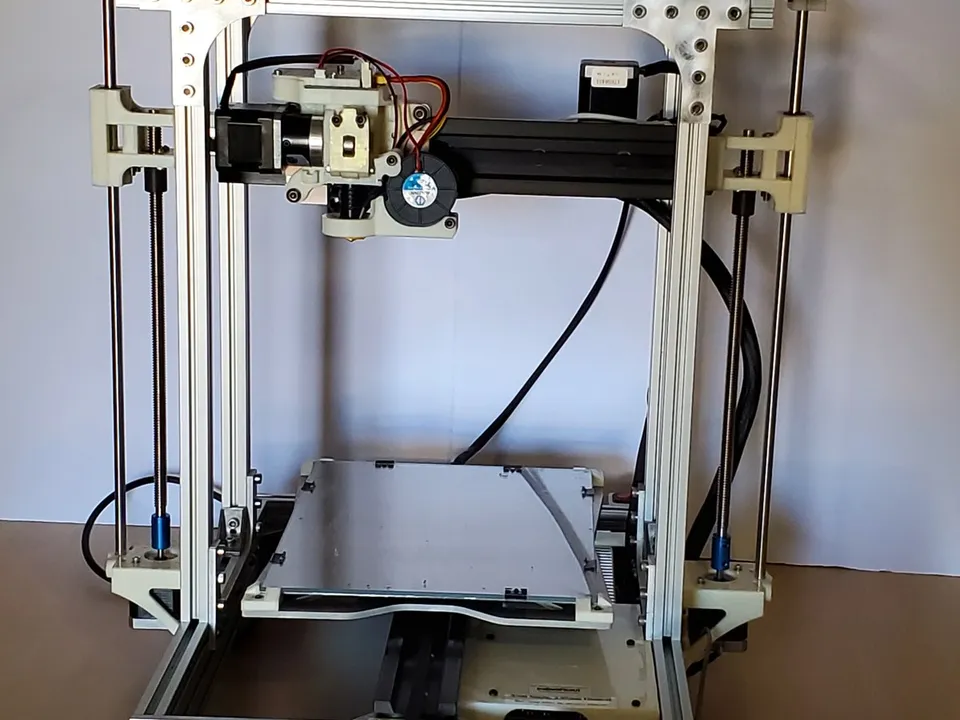
An open-frame aluminium RepRap printer on a table with a touchscreen beside it: a school printer built in 2012 that its owner rebuilt in 2023 with a new control board and wiring harness.
Photo: Chris Cecil, CC BY 2.0

Ask to see the printer’s own print-time counter before you pay, and get a photo of it with the listing. Then price the parts those hours make due, and check which are worn with the used 3D printer inspection checklist.

How do you check the print hours on a used 3D printer?

Ask the seller to show the printer’s own counter: the screen of a Bambu Lab A1 or P1, the statistics menu of an Original Prusa, or the History page of a Klipper printer’s web interface. Marlin counts only if built with its print counter. Most counters can be reset, so treat the figure as a minimum.

Printer Where the print time is What can clear it or leave it out
Bambu Lab P1P, P1S Printer screen, in the device settings. Firmware 01.05.00.00 (January 2, 2024) added a “Total Device Printing Time statistic” Firmware 01.06.00.00 (June 11, 2024) added abnormal pausing time to the total. The notes do not say whether printing before January 2024 counts, or whether a factory reset clears it
Bambu Lab A1, A1 mini Settings > Device > Printing Time, per owners on Bambu Lab’s forum Firmware 01.03.00.00 (June 12, 2024) added abnormal stop time. Reset behavior not stated
Original Prusa i3 MK3S+ and the MK3 family LCD Menu > Statistics: print time and filament used The factory reset options “Statistics” and “All data” erase it; “Service prep” keeps it
Original Prusa MK4, MK4S, CORE One Info > Print Statistics: print time, filament, X, Y and Z axis travel, MMU filament loads and power failures Prusa’s menu articles do not say whether “Reset Settings & Calibrations” clears it
Original Prusa MINI+ Info > Print Statistics > Statistics: print time, filament and axis travel, recorded from firmware 4.3.3 Only finished or stopped prints are saved; a factory reset clears it
Klipper printers running Moonraker (the service behind their web interface), such as the Elegoo Neptune 4 The History page of a Moonraker web interface such as Mainsail: total print time, filament used, total jobs, longest print Needs Moonraker’s [history] section enabled. Moonraker can reset the totals to zero and delete jobs
Creality K1 series, such as the K1 Max, on stock firmware A history record of past print tasks Creality’s release notes treat Moonraker as an add-on enabled after root access, and describe no lifetime total
Marlin printers, such as the Creality Ender-3 V3 SE, whose record lists Marlin-based firmware Send M78 from a USB terminal Only works if the firmware was built with PRINTCOUNTER, which Marlin ships turned off. M78 S78 resets it

How to verify print hours when the counter is missing or reset

A counter shows only the time since it was last cleared. Some printers have none: a P1-series printer still on firmware older than 01.05.00.00, a Marlin printer built without the print counter, or a Klipper printer without Moonraker’s history. Ask for these before you travel:

  • A photo of the statistics screen. Check the same screen in person.
  • Filament used as well as time. Prusa’s MK4, MK4S, CORE One and MINI statistics show filament and axis travel next to print time. Bambu Lab sets several of its wear-part intervals in rolls of filament, so ask how many rolls and which materials.
  • Any job history the seller kept. That can be the History page of a Klipper web interface or the job list in the app they printed from.
  • Receipts for replacement parts. They show what has already been renewed.
  • Whether it ran in a print farm. Bambu Lab’s P1P farewell post describes businesses “built around P1P print farms operating around the clock.”
  • The original receipt. It dates the printer and shows whether any warranty is left.

A counter at zero on a printer sold as used was cleared or never kept, and the inspection checklist treats that as a red flag. Brand-specific checks are in the guides to buying a used Bambu Lab printer, a used Prusa and a used Ender-3.

Do 3D printers wear out?

Their wear parts do. Bambu Lab’s maintenance guides list the hotend, PTFE filament tube, filament cutter blade, nozzle wiper and carbon filter as parts to inspect and replace. Bambu Lab and Prusa both schedule cleaning, lubrication and tension checks for rods, rails, belts and fans. Neither maker gives a replacement interval for the frame, motors or mainboard.

Part What the maker states
Hotend and nozzle Bambu Lab A1: replace the hotend when it is worn and leaking. Bambu Lab’s filament guide says stainless steel and brass nozzles wear out quickly on carbon-fiber, glass-fiber and particle-filled filaments
PTFE tube Bambu Lab A1: replace every 6 rolls of PLA and other non-carbon-fiber filament, every 2 rolls of carbon-fiber. P1 series: check after about 10 rolls, or about 5 rolls of abrasive filament
Filament cutter blade Bambu Lab X1 and P1: check every 3 to 5 rolls, or after 1 to 2 rolls of carbon- or glass-fiber nylon (PA-CF, PA-GF). Bambu Lab found blades can dull after about 5,000 to 7,000 cuts
Activated carbon filter Bambu Lab X1: replace every three months at about 8 hours of printing a day, or every month on a production machine
Extruder gear Bambu Lab X1: replace if worn
Fans Prusa MK4: check and clean “after every few hundred hours of printing”
Rods, bearings and belts Prusa MK4: clean and lubricate the rods and check belt tension every 200 printing hours. Bambu Lab A1: replace a belt when wear affects print quality
Electrical connectors Prusa MK4: check and reseat every 600 to 800 printing hours

Prusa states its intervals in printing hours. Bambu Lab states most of its own in rolls of filament and months, so on a Bambu Lab printer the roll count and the materials printed tell you more than the hour figure.

How many print hours is too many for a used 3D printer?

No maker publishes a maximum hour count for a whole consumer printer, so no figure is too many on its own. Hours tell you which wear parts are due: Prusa schedules checks every 200 printing hours and connector checks every 600 to 800. Weigh the cost of due parts against the asking price, and let the inspection decide.

Replacement prices on the makers’ own US stores, checked November 2, 2026:

Part Fits Price
Bambu Hotend, 0.4 mm stainless steel A1, A1 mini $9.99
Bambu Hotend, 0.4 mm hardened steel A1, A1 mini $11.99
Bambu Hotend, Complete Hotend or Hotend P1 series $34.99 or $14.99
Bambu Hotend, Complete Hotend or Hotend X1C $34.99 or $14.99
Activated Carbon Air Filter X1 series, P1S $5.99
Prusa Nozzle brass, 0.4 mm MK4, MK4S, CORE One $21.99
Assembled hotend for MK3 series MK3 family $79.99
Print fan MK3/S/+, MINI/+ $6.99
Hotend fan MK3/S/+ $13.49
Prusa CORE One Maintenance Kit CORE One $214.99

Say a high-hour MK3S+ needs a new hotend, print fan and hotend fan: at the prices above, the three parts come to $100.47. Prusa’s CORE One Maintenance Kit holds prelubricated bearings, the hotend fan and the part cooling blower, an assembled hotend with a 0.4 mm brass nozzle, a heatbed thermistor set and a PTFE tube. That covers most of the wear parts in one purchase.

A refurbished printer from a maker or retailer comes with its own warranty terms, set out in the refurbished 3D printers guide.

How long do 3D printers last?

No maker publishes a lifespan for a whole consumer printer. Makers publish support periods instead: Bambu Lab committed five years of parts and service after the P1P and X1 series left sale, which it says gives the P1P an eight-year product lifecycle. Its P1 guide says regular cleaning and anti-rust care keep the rods and bearings “functioning well indefinitely.”

Printer Released Sales ended Parts and support until What the maker said
Bambu Lab P1P Dec 2022 February 10, 2026 February 2031 “An eight-year product lifecycle”; firmware feature updates until November 14, 2027 and security patches until November 14, 2029
Bambu Lab X1-Carbon and X1E Aug 2022 (X1-Carbon) March 31, 2026 March 31, 2031 A lifecycle “approaching a decade”; “some parts may sell out earlier”
Original Prusa i3 MK3S+ Nov 2020 Kit production ended February 29, 2024 No end date given Prusa said it would “hold spare parts in our warehouse.” On November 2, 2026 its MK3/S/+ spare parts category listed 60 items, including the assembled hotend at $79.99 and the Einsy RAMBo mainboard at $53.90

Before you pay, look up the exact model’s age and two dates: when its maker stops selling parts, and when security patches end if it connects to the cloud. The used 3D printers topic lists every discontinued printer in the database, and where to buy a used 3D printer covers the buyer protection each platform offers.

Sources

Last verified

  1. Bambu Lab Wiki, P1 series firmware release history (01.05.00.00, January 2, 2024: Total Device Printing Time statistic; 01.06.00.00, June 11, 2024: abnormal pausing time added to the total) (accessed Nov 2, 2026)
  2. Bambu Lab Wiki, A1 firmware release history (01.03.00.00, June 12, 2024: print time calculation includes abnormal stop time) (accessed Nov 2, 2026)
  3. Bambu Lab Wiki, A1 mini firmware release history (01.03.00.00, June 12, 2024: print time calculation includes abnormal stop time) (accessed Nov 2, 2026)
  4. Bambu Lab Community Forum, Total print time on A1 mini? (replies of September 9, 2024: Settings > Device > Printing Time) (accessed Nov 2, 2026)
  5. Bambu Lab Community Forum, Overall printing hours in Bambu App or in P1S menu (replies of January 2024: shown in the printer's device settings after the update, not in Bambu Studio) (accessed Nov 2, 2026)
  6. Prusa Knowledge Base, Print statistics (MK3 family): LCD Menu > Statistics, print time and filament used (accessed Nov 2, 2026)
  7. Prusa Knowledge Base, Factory reset (MK2S/MK2.5S/MK3S): Statistics and All data erase print time records; Service prep keeps them (accessed Nov 2, 2026)
  8. Prusa Knowledge Base, LCD menu (MK4/S, MK3.9/S): Info > Print Statistics (axis travel, filament, MMU filament loads, print time, power failures) (accessed Nov 2, 2026)
  9. Prusa Knowledge Base, LCD menu (CORE One/+): Info > Print Statistics (accessed Nov 2, 2026)
  10. Prusa Knowledge Base, LCD menu (MINI/MINI+): Info > Print Statistics > Statistics (accessed Nov 2, 2026)
  11. Prusa Knowledge Base, Info Screens (MINI/MINI+): statistics from firmware 4.3.3, only finished or stopped prints saved, reset by a factory reset (accessed Nov 2, 2026)
  12. Moonraker documentation, Job History (job totals including total_print_time; reset totals to zero; delete jobs) (accessed Nov 2, 2026)
  13. Mainsail documentation, Print History and Statistics (History page totals; requires the [history] section in moonraker.conf) (accessed Nov 2, 2026)
  14. Elegoo, Neptune4 repository on GitHub (klipper and moonraker) (accessed Nov 2, 2026)
  15. Creality, K1 Series firmware V1.3.2.20 release notes (November 22, 2023: root account; Moonraker risk warning; print tasks started from the history record) (accessed Nov 2, 2026)
  16. Marlin Firmware, M78: Print Job Stats (S78 resets all statistics) (accessed Nov 2, 2026)
  17. Marlin Firmware on GitHub, Configuration.h (bugfix-2.1.x): PRINTCOUNTER commented out by default (accessed Nov 2, 2026)
  18. Marlin Firmware Configurations on GitHub, Creality Ender-3 (CrealityV422) example Configuration.h, release-2.1.2.5: PRINTCOUNTER commented out (accessed Nov 2, 2026)
  19. Bambu Lab Wiki, A1 Maintenance Guidelines (hotend, PTFE tube, extruder gear, belts) (accessed Nov 2, 2026)
  20. Bambu Lab Wiki, P1 series printer Maintenance Recommendation (PTFE tube checks; rods and bearings 'functioning well indefinitely') (accessed Nov 2, 2026)
  21. Bambu Lab Wiki, X1 Maintenance Recommendation (filament cutter, carbon filter, extruder gear, fans) (accessed Nov 2, 2026)
  22. Bambu Lab Wiki, Filament guide: stainless steel and brass nozzles with carbon-fiber, glass-fiber and particle-filled filaments (accessed Nov 2, 2026)
  23. Prusa Knowledge Base, Regular printer maintenance (MK4/S, MK3.9/S): checks every 200 printing hours, fans every few hundred hours, connectors every 600-800 hours (accessed Nov 2, 2026)
  24. Bambu Lab US Store, Bambu Hotend - A1/A2 ($9.99 for 0.4 mm stainless steel, $11.99 for 0.4 mm hardened steel, November 2, 2026) (accessed Nov 2, 2026)
  25. Bambu Lab US Store, Bambu Hotend - P1 Series ($34.99 Complete Hotend, $14.99 Hotend, November 2, 2026) (accessed Nov 2, 2026)
  26. Bambu Lab US Store, Bambu Hotend - X1C ($34.99 Complete Hotend, $14.99 Hotend, November 2, 2026) (accessed Nov 2, 2026)
  27. Bambu Lab US Store, Activated Carbon Air Filter - X1/P1 Series ($5.99, November 2, 2026) (accessed Nov 2, 2026)
  28. Prusa Research store, Prusa Nozzle brass - 0.4 mm ($21.99 shipped to the United States, November 2, 2026) (accessed Nov 2, 2026)
  29. Prusa Research store, Prusa CORE One Maintenance Kit ($214.99 shipped to the United States, November 2, 2026; contents: LM8UU and LM10LUU prelubricated bearings, hotend fan and blower fan, assembled hotend with 0.4 mm brass nozzle, heatbed thermistor set, PTFE tube) (accessed Nov 2, 2026)
  30. Prusa Research store, MK3/S/+ Spare parts (60 items; assembled hotend $79.99, Einsy RAMBo $53.90, print fan $6.99, hotend fan $13.49, United States prices, November 2, 2026) (accessed Nov 2, 2026)
  31. Bambu Lab Blog, A farewell to P1P (February 10, 2026): parts and support until February 2031, an eight-year product lifecycle, P1P print farms operating around the clock (accessed Nov 2, 2026)
  32. Bambu Lab Blog, The X1-series is EOL (March 31, 2026): support until March 31, 2031, a lifecycle approaching a decade, some parts may sell out earlier (accessed Nov 2, 2026)
  33. Prusa Research blog, Goodbye, MK3! The end of an era is close… or is it? (February 27, 2024): MK3S+ kit ends February 29, 2024; support continues; spare parts held in the warehouse; upgrade kits (accessed Nov 2, 2026)