An open 10 to 40 W diode laser module is a Class 4 laser, the highest hazard class: its direct or reflected beam can injure eyes and skin instantly, and it can set the workpiece on fire. Sealed inside an interlocked enclosure, the same module makes the whole machine a Class 1 laser product, which the FDA considers non-hazardous. That holds only while every door, window and interlock is intact.
How dangerous are desktop laser modules?
An exposed 10 W or 40 W diode laser is dangerous: it is Class 4, which the FDA describes as an immediate eye and skin hazard from the direct or reflected beam and a possible fire hazard. Class 4 starts above 0.5 W, so a 10 W module is 20 times past the threshold.
- Eyes. Bambu Lab’s module emits 455 nm blue light. Its laser safety document warns that blue light “can penetrate the cornea and lens to reach the retina” and cause retinal burns.
- Reflections. OSHA’s technical manual calls Class 4 lasers “hazardous to view under any condition (directly or diffusely scattered).” A diffuse glint off the workpiece is a hazard too.
- Skin. The direct beam is an immediate burn hazard.
- Fire. The beam is meant to burn material, so flames are part of normal use. Bambu Lab warns that basswood and acrylic “have a high likelihood of producing open flames.”
An enclosed combo carries the same Class 4 module. Only the enclosure keeps the beam away from you.
What laser class are 3D printer laser combos?
Enclosed combos are Class 1 laser products containing a Class 4 module. Bambu Lab lists its H2-series 10 W and 40 W modules as Class 4 and the machine as Class 1. Snapmaker says the Artisan’s enclosure reduces laser hazards from Class 4 to Class 1. An open-frame combo without an enclosure stays Class 4.
What each maker publishes:
- Bambu Lab H2D, H2C and H2S (and the H2D Pro through the upgrade kit). The laser comes as a Laser Full Combo or an add-on kit. The spec sheet lists “Laser Safety Class for Laser Module: Class 4” and “Overall Laser Safety Class: Class 1.” A footnote sets the condition: “When the printer’s protection is complete and properly working, the printer and laser module work as a class 1 laser product.” The Bambu Lab H2S takes the 10 W module only. The Bambu Lab H2D and Bambu Lab H2C take the 10 W or the 40 W.
- Snapmaker Artisan. It ships with a “Laser Class 1 Safety Enclosure” whose door sensor “automatically halts the laser or CNC job when any door is opened.” See the Snapmaker Artisan record.
- Snapmaker 2.0 (A350T, A250T, F350, F250). These are open-frame machines. Snapmaker labels its 20 W and 40 W modules Class 4. It says the Enclosure for Snapmaker 2.0 reduces the hazard “from class four to the lowest level of class one” and pauses laser jobs when a door opens. Without that enclosure, the beam is exposed.
The laser combo list shows every printer in the database with a laser option and the module powers offered. The 3D printer laser combos topic gathers the guides and records on these machines.
How to read the class on a US label
Laser products sold in the US must meet the FDA performance standards in 21 CFR 1040.10 and 1040.11. Under Laser Notice No. 56 (May 8, 2019), the FDA accepts conformance with the international standard IEC 60825-1 Ed. 3 in place of most of those requirements, with listed exceptions. So a US label can carry an IEC class (1 to 4) instead of the FDA’s Roman numerals (I to IV). The FDA treats the two scales as roughly equivalent.
The label on Bambu Lab’s 10 W module reads “CLASS 4 LASER PRODUCT,” then “Complies with 21 CFR 1040.10 and 1040.11 except for conformance with IEC 60825-1 Ed.3, as described in Laser Notice No. 56.” A Class 4 sticker on the module of a Class 1 machine is normal.
OSHA notes that the federal standard requires no class label on a Class 1 product. It adds that most Class 1 laser equipment is “a higher class (high power) laser enclosed in a properly interlocked and labeled protective enclosure.” Look for the overall product class on the spec sheet, separately from the module’s class.
Do you need laser safety glasses with an enclosed laser combo?
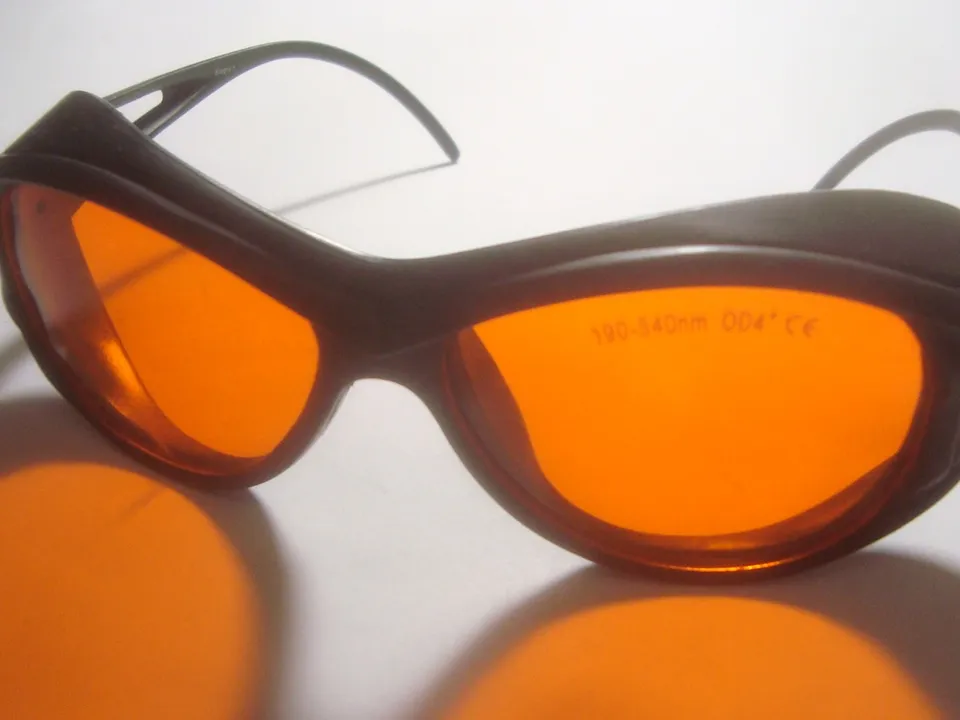
Not to watch a Class 1 combo run with every door, window and interlock intact: the FDA treats Class 1 as non-hazardous. You need goggles rated for the laser’s wavelength whenever a module runs without its enclosure or with an interlock bypassed. Snapmaker still recommends wearing goggles with its enclosure, for extra protection.
Snapmaker’s wording is “For optimal protection, we recommend using both an enclosure to block laser radiation and goggles for eye safety.” Bambu Lab’s guidance is to avoid looking at the laser spot or its reflection through the door or safety windows “for prolonged periods.”
If you buy goggles, match them to the laser:
- Wavelength. The lens must block every wavelength on the laser’s label. Bambu Lab’s H2 modules emit 455 nm blue light for engraving and 850 nm infrared for height measurement. Snapmaker specifies goggles rated “190-540nm OD6+ and 900-1700nm OD4+” for its 20 W and 40 W modules.
- Optical density (OD). OD is a logarithmic measure of how much light the lens blocks: OD 4 lets through one ten-thousandth, OD 6 one millionth. OSHA computes the OD a laser needs from the exposure limits in ANSI Z136.1, the US standard for the safe use of lasers.
- Marking. OSHA’s construction rule (29 CFR 1926.102) calls for goggles that “protect for the specific wavelength of the laser and be of optical density (O.D.) adequate for the energy involved.” Eyewear with no wavelength and OD marking does not meet that description.
- Condition. Bambu Lab’s checklist: a lens free of pits, scratches and coating damage; a frame free of cracks; no gaps between frame and face.
Is an enclosed laser still Class 1 with the door open?
No. A Class 1 rating describes the closed machine with every safety part in place. Bambu Lab and Snapmaker interlock the doors so the laser stops when one opens. Removing a safety window, defeating a door sensor or running a module outside the machine leaves an exposed Class 4 beam.
- Bambu Lab: “The laser module stops working if the front door, top glass cover, or safety window is opened.” Bambu Lab also lists laser module installation detection and includes a safety key. Its instruction is “Do not operate the laser module unless it is correctly installed with all safety locking and detection mechanisms active.”
- Snapmaker: the Artisan and the 2.0 enclosure pause a laser job when a door opens.
Buying the laser later for a non-laser Bambu Lab H2 printer? The Laser Upgrade Kit includes the laser safety windows, a top laser protection plate and an emergency stop button. The H2D and H2C kit adds front, left and right windows; the H2S kit adds a front window. The module-only package contains the module, a lens and a manual.
Which safety features should a laser combo’s spec sheet list?
Look for an overall Class 1 rating stated apart from the module’s Class 4, door and lid interlocks, flame detection, an emergency stop button, laser-filtering viewing windows, and air assist with fume extraction. If a spec sheet leaves one out, ask the maker before you buy.
- Overall laser class. “Class 1” for the whole machine, stated separately from the module’s Class 4, plus the FDA compliance line (21 CFR 1040.10, often with Laser Notice No. 56).
- Interlocks. Which openings stop the laser: door, lid, side windows. Bambu Lab lists a door sensor, module installation detection and a safety key. Snapmaker lists door detection.
- Flame detection. Bambu Lab’s H2 chamber has a flame sensor that sends a push notification and sounds a buzzer. Snapmaker’s Artisan page lists no flame sensor.
- Emergency stop button. Included in Bambu Lab’s upgrade kit and built into the Snapmaker Artisan.
- Laser-filtering windows. Viewing panels rated to block the laser: Bambu Lab’s “Laser Safety Window” panels, Snapmaker’s “enclosure panels specially designed for laser reduction.”
- Air assist. A pump that blows air at the cut. Bambu Lab lists a built-in air pump (30 kPa, 30 L/min). Snapmaker says its Air Assist reduces fire hazards.
- Fume extraction. An exhaust duct or filter for the smoke. Bambu Lab’s kit has a 100 mm ventilation pipe adapter, and Bambu Lab says not to cut materials that release harmful gases, such as PVC. The laser engraving fumes guide covers venting.
Can you leave a desktop laser running unattended?
No: both makers say so in writing. Bambu Lab: “Do not leave the product unattended when the laser is working.” Snapmaker: “Ensure you never leave the powerful laser unattended.” A flame sensor does not change this, because Bambu Lab describes its sensor as sending alerts, not putting a fire out.
Bambu Lab’s fire guidance for its laser:
- Keep a CO2 fire extinguisher within reach and use it at once if flames appear.
- Watch basswood and acrylic jobs closely; both are likely to flame.
- Clear debris from the laser platform after every job.
- Keep paper, alcohol and gasoline away from the machine.