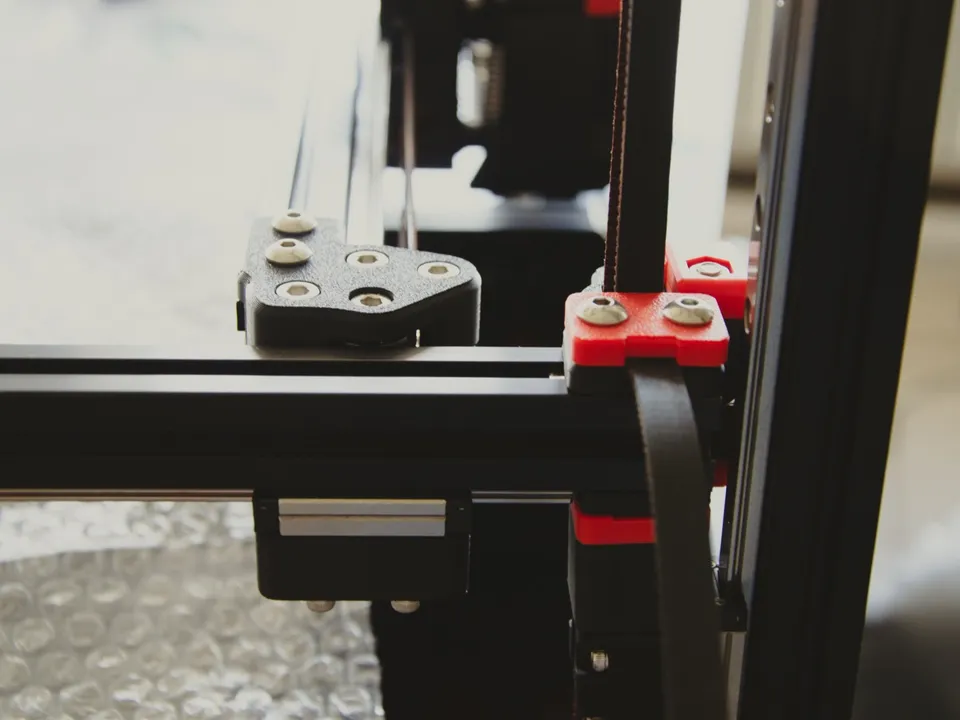
Linear rails, smooth rods and V-wheels are three ways to guide a printer’s toolhead or bed in a straight line: a grooved steel track with a ball-bearing carriage, a polished steel shaft with bearings sliding on it, or plastic rollers in an aluminum extrusion. Rails are the stiffest on paper. In a published side-by-side test against wheels, print quality barely changed.
What are linear rails on a 3D printer?
A linear rail (also called a linear guide or guideway) is a hardened steel rail with machined grooves. A carriage rides on it, rolling on rows of steel balls that recirculate inside the block. On a 3D printer it guides the toolhead or bed along one axis. It is bolted down along its whole length.
HIWIN, a linear guide maker, describes the design as “re-circulating rolling elements between a profiled rail and a bearing block,” and says the guides “are able to take loads in all directions.” For one printer’s rail sizes, Wikipedia’s Voron 2.4 article lists “MGN7, MGN9 or MGN12” rails on its three axes.
What is the difference between linear rails, rods and wheels?
The three differ in what the moving part rides on. A rail carriage rolls on balls in grooves cut into a fixed steel track. A rod carriage slides on linear ball bearings or bushings around a round steel shaft. A wheeled carriage rolls on plastic V-wheels inside the slot of an aluminum frame extrusion.
|
Linear rail |
Smooth rod |
V-slot wheels |
| The track |
Grooved steel rail, bolted along its length |
Round hardened-steel shaft |
V-shaped slot in an aluminum extrusion |
| What rides on it |
Carriage with recirculating balls |
Linear ball bearings or bushings; the RepRap wiki calls LM8UU the most common size |
Polyoxymethylene (POM, sold as Delrin) wheels with ball bearings inside |
| Stiffness and load |
Highest; mounted flat, so “no deflection” |
The shaft must be sized against bending; the bearing fit is “relatively loose” |
Sold for “light load applications” |
| Spec-sheet wording |
“Linear rail”, “linear guide rail” |
“Linear rods”, “linear shafts” |
“POM V-guide wheels” |
MISUMI, an industrial parts supplier, says rod shafts must be sized to carry the load “within an acceptable deflection tolerance,” or “the shafts will bend.” It puts the resulting errors “on the order of a few thousandths of an inch,” against rail errors “usually measured in the micrometers (μm) range.” The costs of a rail, in its list, are “higher cost” and “higher maintenance concerns.”
OpenBuilds, which sells V-wheels, describes its Delrin wheels as made for light loads and “Self-Centering and Self-Lubricating.”
Each type has its own lubrication rule (Bambu Lab, for example, forbids grease on the A1’s X-axis linear rail), so the maker’s maintenance page is worth a look before buying.
Do linear rails matter on a 3D printer?
A rail is the stiffest and most precise of the three guides, and makers cite precision and long-term smoothness when they fit one. But print quality comes from the whole machine. Frame stiffness, belts, the motion system and firmware such as input shaping all count, and a published side-by-side test found little difference.
Makers state their reasons on their product pages. Sovol says the SV08 uses “linear rails for all 7 axes (4Z+2Y+1X)” “to improve precision and resistance to axial movement deformation.” QIDI says the X-axis rail on the Q2 “maintains smooth performance and accuracy over long-term use.” Neither page publishes a measurement comparing the rail with another guide type.
The guide is one part of a larger system. The motion system decides what moves and how heavy it is. Input shaping, which Klipper’s documentation describes as a way “to reduce ringing,” works in firmware whatever guide the printer uses.
Do linear rails make a measurable difference?
Not much, in the side-by-side test Hackaday reported in August 2024. A maker named Spencer compared V-slot wheels with linear rails and “didn’t really find that much difference” in print quality. The rails were quieter and “more stable in terms of resonance,” though input shaping can offset that.
The same report adds two limits. The rails’ noise “was only a small fraction of the total noise generated by the printer.” Spencer also said he “isn’t an expert on setting up linear rails.” It is one tester’s result, not a lab study.
Which 3D printers have linear rails?
Spec sheets name the guide hardware only some of the time, and the records here have no field for it, so check the maker’s page. Sovol lists rails on every axis of the SV08 and the Zero. QIDI and Creality use one on the X axis. Bambu Lab’s A1 runs on rails in X and Y.
By guide type, as each maker describes it:
What is the difference between a belt and a leadscrew Z axis?
A leadscrew Z axis turns a threaded screw through a nut, and each turn moves the bed or gantry a fixed distance. A belted Z axis lifts it on motor-driven toothed belts. Leadscrews drive Z on the Bambu Lab A1, QIDI Q2 and Neptune 4 Pro. Belts drive it on the Creality Ender-3 V3 and the Voron 2.4 kit.
The “lead” of a leadscrew is, in Wikipedia’s words, “the amount of distance travelled per rotation.” A leadscrew can also hold its load without the motor: it is “self-locking when the coefficient of friction is greater than the tangent of the lead angle.” The article warns that this “is not absolute” under vibration or shock.
Several printers use more than one screw. The Neptune 4 Pro pairs two lead screws with two motors for “better synchronization.” The A1 uses two screws. QIDI lists “Dual Independent Lead Screw Motors” for the Q2, and Bambu Lab’s maintenance guide for the X1 series covers three Z lead screws.
On the Creality Ender-3 V3, a CoreXZ design, Creality says the X and Z axes “are rigged together.” It credits “the precise linear rods and timing belts” with “less wobbling” and lists Z positioning accuracy of “≤15㎛,” a figure from “Creality Lab.”
The Voron 2.4, a self-built kit outside this database, keeps the print plate fixed and uses “separate belts for moving the print head along the z-axis,” according to Wikipedia.
Some printers list Z motors without the drive type. Sovol’s SV08 page names four Z rails and “4 independent Z motors” for quad gantry leveling, but not the drive. For any printer, check the maker’s spec page for both the Z drive and the guides, and use the printer database and the motion systems hub to compare the rest of the spec sheet.